1. Getting Started: Why Is Power Distribution So Important in a Data Center?
Imagine you’re watching your favorite video, playing an online game, or searching something on Google.
Everything seems simple: click → instant result.
But behind the scenes, data centers are operating 24 hours a day, 7 days a week—and everything depends on electricity.
The challenge is that electrical power can:
– Go out unexpectedly
– Experience voltage drops
– Become unstable
If the power goes out for even one second, a data center could experience:
– Server reboots
– Data corruption
– Website outages
– Millions—or even billions—of dollars in losses
That’s why electrical power in a data center cannot simply be connected directly to the servers.
It must follow a carefully designed power distribution system that is reliable, protected, and backed up by multiple layers of redundancy.
In this article, we’ll take a step-by-step journey through the power distribution system, from:
→ Utility power
→ Into the data center electrical system
→ All the way to the server rack
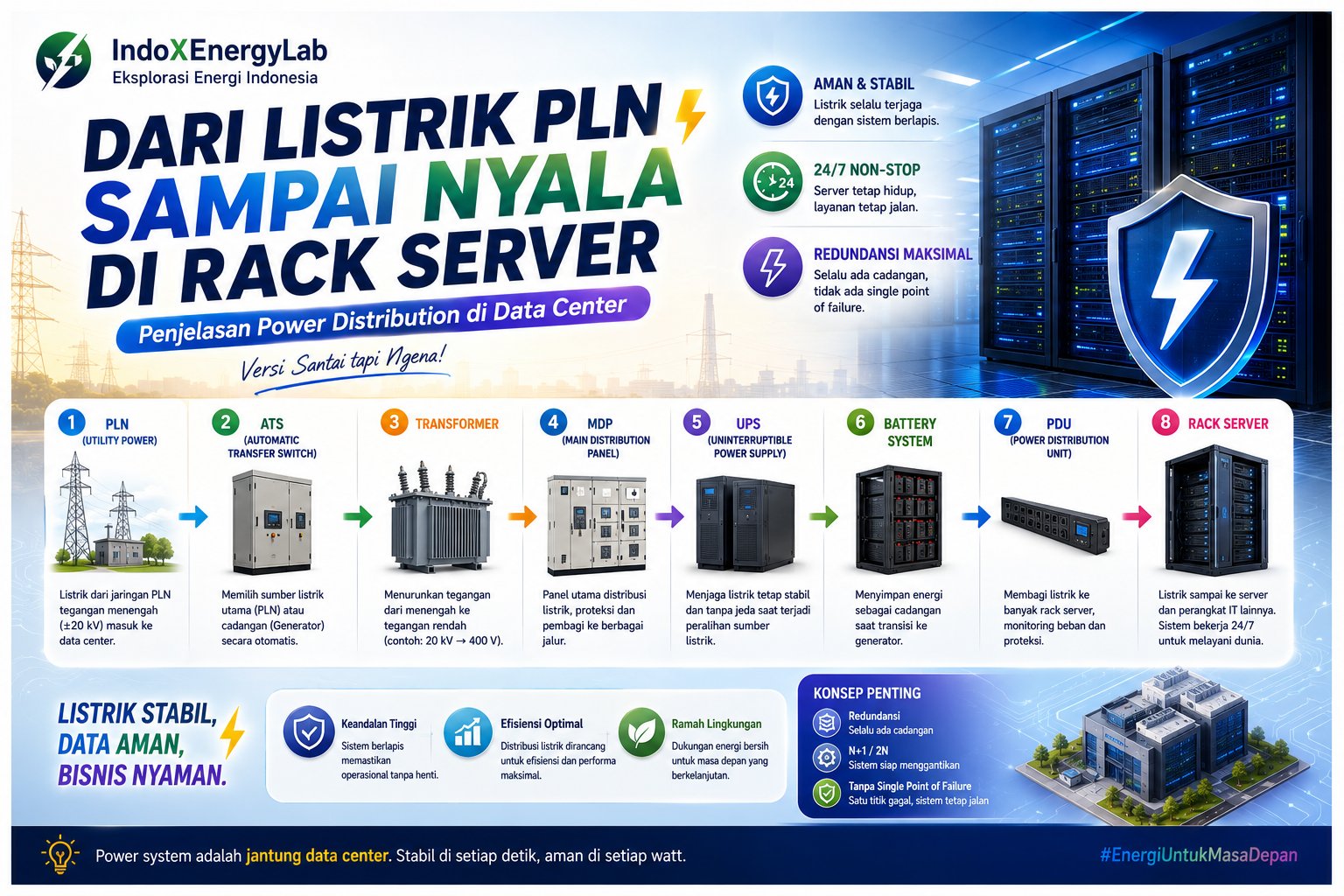
2. The Big Picture: Power Flow Inside a Data Center
Before diving into each component, let’s look at the overall power flow.
Utility Power
↓
Automatic Transfer Switch (ATS)
↓
Transformer
↓
Main Distribution Panel (MDP)
↓
Uninterruptible Power Supply (UPS)
↓
Power Distribution Unit (PDU)
↓
Server Rack
Two additional components play critical roles:
– Generator — provides backup power if the utility supply fails.
– UPS Batteries — bridge the gap during the transition between power sources.
Don’t worry—we’ll cover each component one by one in a simple and easy-to-follow way.
3. Utility Power: Electricity Enters the Data Center
3.1 What Is Utility Power?
Utility power is the primary source of electricity supplied by:
– The public utility company
– The national electrical grid
For most data centers, electricity arrives as medium-voltage power, typically around 20 kV.
Why such a high voltage?
– It improves transmission efficiency.
– It minimizes power losses.
– It supports very large electrical loads.
A data center consumes an enormous amount of electricity.
A single facility can use as much power as an entire residential neighborhood.
3.2 Why Can’t a Data Center Rely Only on Utility Power?
Even though utility power is generally reliable, interruptions can still occur because of:
– Power outages
– Electrical disturbances
– Scheduled maintenance
For a home, losing power for an hour may simply be inconvenient.
For a data center, it can be catastrophic.
That’s why utility power is never the only source of electricity.
4. Automatic Transfer Switch (ATS): The Intelligent Power Selector
4.1 What Does an ATS Do?
An Automatic Transfer Switch (ATS) is a smart device responsible for:
– Selecting the active power source
– Automatically switching between available sources
The ATS continuously monitors two power supplies:
– Utility power (primary source)
– Generator power (backup source)
4.2 How Does an ATS Work?
Its operation is straightforward:
1. Utility power is available → ATS selects utility power.
2. Utility power fails or becomes unstable → ATS automatically switches to the generator.
3. Utility power returns to normal → ATS transfers the load back to utility power.
This entire process occurs within seconds.
Think of it like having two power banks for your phone.
If one battery runs out, the phone automatically switches to the other without interrupting operation.
5. Backup Generator: The Hero During Power Outages
5.1 Why Does a Data Center Need a Generator?
Because a UPS cannot power the facility forever.
The batteries inside a UPS only provide temporary power during the transition period.
The generator serves as the long-term backup power source whenever utility power is unavailable.
5.2 How Does the Generator Work?
The sequence typically works like this:
1. Utility power fails.
2. The UPS immediately supplies power to the servers.
3. The generator starts automatically.
4. Once generator output stabilizes, the electrical load is transferred to the generator.
The entire process happens automatically.
The servers continue operating without interruption.
6. Transformer: Reducing Voltage to Safe Levels
6.1 Why Must Voltage Be Reduced?
Electricity supplied by the utility arrives at approximately 20 kV.
Server equipment cannot operate directly at this voltage.
That’s why a transformer is required.
6.2 What Does the Transformer Do?
The transformer’s job is to reduce the incoming voltage.
Typical examples include:
– 20 kV → 480 V
– 20 kV → 400 V
Why not reduce it directly to 220 V?
Because higher distribution voltages:
– Improve efficiency
– Reduce current
– Provide better performance over longer distances
7. Main Distribution Panel (MDP): The Main Power Distribution Hub
7.1 What Is an MDP?
The Main Distribution Panel (MDP) is the central electrical panel responsible for distributing power throughout the facility.
It serves as the primary control point before electricity reaches critical systems.
Inside the MDP:
– Power is divided into multiple distribution circuits.
– Circuit breakers provide electrical protection.
– Voltage and current are continuously monitored.
7.2 Why Is the MDP Important?
If an electrical problem occurs, such as:
– Overloading
– Short circuits
– Localized faults
the MDP can isolate only the affected section without shutting down the entire data center.
8. UPS (Uninterruptible Power Supply): Keeping Servers Alive
8.1 What Is a UPS?
A UPS combines:
– Power electronics
– Battery storage
Its primary purpose is to deliver uninterrupted power whenever the primary source changes.
The main function is to keep servers running continuously during power transitions.
8.2 Why Is a UPS Essential?
Imagine this situation:
– Utility power fails.
– The generator requires 5 to 10 seconds before reaching stable operation.
Without a UPS:
– Servers shut down.
– Data may become corrupted.
– Systems experience unexpected failures.
With a UPS:
The servers continue operating without noticing the power interruption.
8.3 Common UPS Type Used in Data Centers
Most data centers use:
Online UPS
With an Online UPS:
– All incoming electricity continuously passes through the UPS.
– Power quality remains extremely stable.
– It offers the highest level of protection.
Although it is more expensive, it is also the safest solution.
9. UPS Battery System: Temporary Energy Storage
9.1 What Is the Purpose of UPS Batteries?
The batteries inside the UPS:
– Store electrical energy
– Supply power immediately when utility power is lost
Battery runtime typically ranges from:
– 5 minutes
– 10 minutes
– 15 minutes
depending on the data center design.
9.2 Why Don’t Batteries Last Longer?
Because batteries are:
– Expensive
– Heavy
– Heat-generating
Their primary role is not to power the data center for hours.
Instead, they simply bridge the gap until the generator is fully operational.
10. Power Distribution Unit (PDU): The Final Distribution Stage
10.1 What Is a PDU?
A Power Distribution Unit (PDU) is a specialized electrical distribution panel dedicated to IT equipment.
PDUs are usually installed close to the server room.
Typical output voltages include:
– 208 V
– 230 V
– 120 V
depending on the facility design.
10.2 What Does a PDU Do?
A PDU is responsible for:
– Distributing power to multiple server racks
– Monitoring electrical loads
– Protecting individual branch circuits
Some facilities also use Smart PDUs, which can be remotely monitored and managed through the network.
11. Server Rack: The Final Destination of Electrical Power
11.1 What Is a Server Rack?
A server rack is a cabinet that houses equipment such as:
– Servers
– Network switches
– Storage devices
This is where:
– Data is processed
– Applications run
– Internet services remain online
11.2 Power Distribution Inside the Rack
Most enterprise server racks are equipped with:
– Dual power supplies (A and B)
Each power supply connects to:
– PDU A
– PDU B
The purpose is redundancy.
If one power path fails, the second path continues supplying power.
12. A Critical Concept: Redundancy and Reliability
Data center design always emphasizes concepts such as:
– N+1
– 2N
– Tier classifications
These concepts all have one goal:
Always maintain a backup.
Avoid any single point of failure.
Every major power component—including:
– Utility power
– Generator
– UPS
– PDU
must be capable of experiencing a failure while allowing the entire data center to continue operating.
13. Power Distribution Summary
Here’s the complete journey in simple terms:
1. Utility power enters the facility.
2. The ATS selects the available power source.
3. The transformer reduces the voltage.
4. The Main Distribution Panel distributes electricity.
5. The UPS keeps power stable.
6. UPS batteries bridge the transition period.
7. PDUs distribute electricity to each server rack.
8. Servers continue operating 24 hours a day, 7 days a week.
14. Conclusion: Electricity Is the Heart of a Data Center
If a data center were compared to the human body:
– Servers would be the brain.
– The network would be the nervous system.
– The power system would be the heart.
Without electricity that is:
– Stable
– Reliable
– Protected by multiple layers of redundancy
a data center simply cannot operate.
Hopefully, after reading this article:
– Students can understand the overall concept.
– College students can connect the explanation to engineering theory.
– Industry professionals can say, “Yes, this is exactly how it works in the field.”
If you’re interested in:
– A more technical version
– An infographic version
– Or a version customized for IndoXEnergyLab
just let me know. ⚡🔌