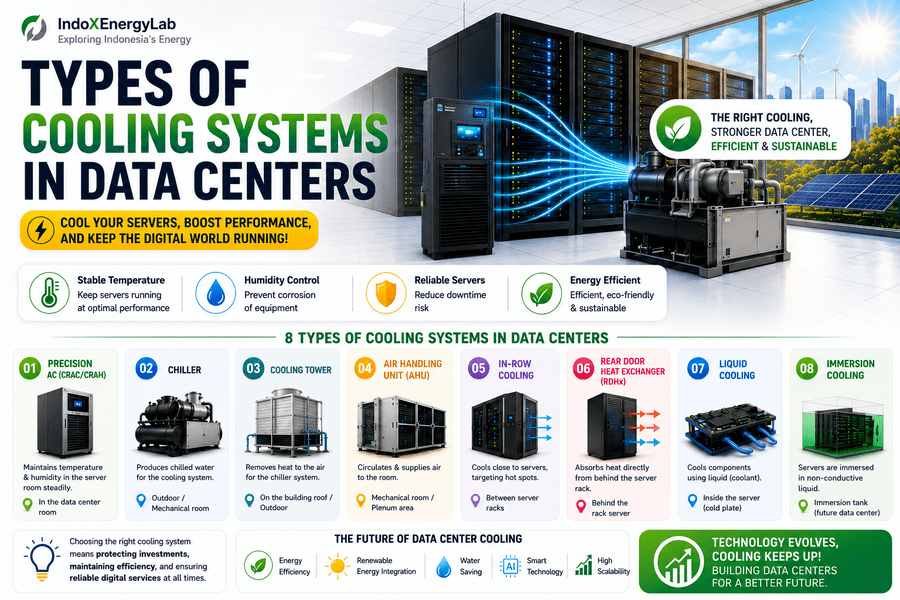
Types of Cooling Systems in Data Centers
Understanding CRAC, CRAH, Chillers, Liquid Cooling
Data centers are often called the heart of the digital world. From WhatsApp and YouTube to cloud computing, artificial intelligence (AI), and online banking systems, nearly every digital service we rely on runs inside a data center.
However, one critical component often goes unnoticed: cooling.
Data center servers operate 24 hours a day, 7 days a week. If the heat they generate isn’t properly managed, servers can throttle their performance, suffer hardware damage, or even shut down completely. That’s why cooling systems aren’t just supporting equipment—they are mission-critical infrastructure.
In this article, we’ll explore the different types of cooling systems used in data centers, their functions, key differences, and where they’re typically installed. The explanation is simple and approachable, making it suitable for everyone—from elementary school students to university learners.
1. Why Do Data Centers Need Specialized Cooling?
Before discussing the different cooling technologies, let’s first understand why they’re necessary.
A server is essentially a highly powerful computer containing components such as:
• CPUs
• GPUs
• Power supplies
• Storage devices
Every one of these components generates heat.
Imagine a single data center rack containing 10 to 50 servers. If one server produces as much heat as a small electric iron, an entire rack is like dozens of irons operating simultaneously.
Without proper cooling:
• Server lifespan decreases.
• Electricity consumption increases.
• The risk of downtime becomes much higher.
This is why data centers require cooling systems that are far more sophisticated than the air conditioners used in homes.
2. Precision Air Conditioning (CRAC & CRAH)
What Is Precision Air Conditioning?
Precision air conditioning is specifically designed for data center environments, not for human comfort.
Unlike residential air conditioners that simply make a room comfortable, precision cooling systems maintain:
• Stable temperatures (typically 22–25°C or 72–77°F)
• Controlled humidity
• Consistent airflow
Primary Functions
• Remove heat generated by servers.
• Maintain stable room temperatures.
• Control humidity to prevent excessive dryness or moisture.
Where Is It Installed?
• Inside the data hall (white space)
• Usually positioned along the room perimeter or near server racks
CRAC vs. CRAH
CRAC (Computer Room Air Conditioner)
• Uses a direct refrigeration system.
CRAH (Computer Room Air Handler)
• Uses chilled water supplied by a central chiller.
Best Suited For
• Small to medium-sized data centers
• On-premises server rooms
3. Chiller System
What Is a Chiller?
A chiller is a large cooling machine that cools water rather than air directly.
The chilled water is then circulated to CRAH units or Air Handling Units (AHUs).
Think of a chiller as a giant ice-making plant for a building.
Primary Functions
• Produce chilled water.
• Supply cooling to other HVAC components.
Where Is It Installed?
• Outdoors (rooftops or equipment yards)
• Dedicated mechanical rooms
Types of Chillers
Air-Cooled Chiller
• Rejects heat directly into the surrounding air.
Water-Cooled Chiller
• Rejects heat through a cooling tower.
Best Suited For
• Large enterprise data centers
• Hyperscale facilities
4. Cooling Tower
What Is a Cooling Tower?
A cooling tower removes heat from a water-cooled chiller by transferring it into the outdoor air through evaporative cooling.
It typically operates alongside water-cooled chillers.
Primary Functions
• Reject heat from the chiller system.
• Improve overall cooling efficiency.
Where Is It Installed?
• Rooftops
• Outdoor utility areas
Important Notes
Cooling towers:
• Require water.
• Need regular maintenance.
• Are highly efficient but mechanically more complex.
5. Air Handling Unit (AHU)
What Is an AHU?
An Air Handling Unit (AHU) conditions and distributes air throughout a building.
In data centers, AHUs commonly work together with:
• Chillers
• Air filters
• Ductwork
Primary Functions
• Deliver cooled air.
• Filter airborne dust and contaminants.
• Maintain proper room air pressure.
Where Is It Installed?
• Mechanical rooms
• Ceiling plenum spaces
Best Suited For
• Large data centers
• Centralized cooling systems
6. In-Row Cooling
What Is In-Row Cooling?
An In-Row Cooling unit is installed directly between server racks.
Because the cooling source is positioned close to the heat source, cooling becomes much more efficient.
Primary Functions
• Deliver cooling directly to servers.
• Eliminate hot spots.
Where Is It Installed?
• Between server rack rows
Best Suited For
• High-density data centers
• Existing facilities undergoing upgrades
7. Rear Door Heat Exchanger (RDHx)
What Is an RDHx?
A Rear Door Heat Exchanger (RDHx) replaces the standard rear door of a server rack with a heat exchanger.
As hot air exits the servers, it is cooled immediately before entering the room.
Primary Functions
• Capture heat directly from servers.
• Reduce the cooling load on room air conditioning.
Where Is It Installed?
• On the rear of server racks
Best Suited For
• High-Performance Computing (HPC)
• AI and GPU-intensive servers
8. Liquid Cooling
What Is Liquid Cooling?
Liquid cooling uses water or specialized coolant to absorb heat directly from CPUs and GPUs.
Liquids transfer heat much more efficiently than air.
Primary Functions
• Provide extreme cooling performance.
• Improve energy efficiency.
Where Is It Installed?
• Inside servers
• Using cold plates or coolant distribution systems
Best Suited For
• AI data centers
• Supercomputers
• Next-generation computing facilities
9. Immersion Cooling
What Is Immersion Cooling?
In immersion cooling, servers are submerged in a specially engineered dielectric liquid that does not conduct electricity.
The liquid absorbs heat directly from all electronic components.
Primary Functions
• Extremely efficient heat removal.
• Minimal or no reliance on cooling fans.
Advantages
• Significant energy savings.
• Very low noise levels.
• Excellent cooling performance.
Disadvantages
• High installation costs.
• Technology is still evolving.
10. Quick Comparison of Data Center Cooling Systems
| Cooling System | Typical Scale | Efficiency | Complexity |
| Precision Air Conditioning (CRAC/CRAH) | Small–Medium | Moderate | Low |
| Chiller + CRAH | Large | High | High |
| In-Row Cooling | Medium–High | High | Moderate |
| Liquid Cooling | High-Density | Very High | High |
| Immersion Cooling | Future Data Centers | Extremely High | Very High |
11. Conclusion
Cooling is the backbone of every data center.
Without an effective cooling system:
• Expensive servers can overheat and fail.
• Electricity consumption increases.
• Digital services become unreliable.
• Downtime becomes more likely.
Looking ahead, data center cooling is evolving toward:
• Higher energy efficiency
• Liquid cooling technologies
• Integration with renewable energy systems
• AI-driven cooling optimization
If you’re interested in energy systems, HVAC engineering, or data center infrastructure, understanding cooling technologies is one of the most valuable foundations you can build. As computing power continues to grow, efficient thermal management will become even more essential to supporting the future of the digital world.